

Pre-owned Colour Printer: Buying Guide for Businesses

The lowest purchase price can become the costliest choice if a printer cannot keep pace with daily work. A pre-owned colour printer needs to suit your business’s print volumes, document types and workplace demands, not just its initial cost.
Weigh the potential savings against the practicalities of reliability, toner, spare parts and maintenance. A printer that handles occasional reports may not suit a team producing colour documents throughout the day. The right choice depends on how the equipment will be used and what it will need to keep running.
This guide explains how to assess a pre-owned colour printer against your workflow, plan for ongoing ownership needs and compare it with a new machine. It covers the practical details that matter when evaluating print capacity and consumables, helping South African businesses make a considered decision. Use the guidance to weigh the trade-offs and choose equipment that supports daily operations, rather than focusing on purchase price alone.
Table of Contents
Why consider a pre-owned colour printer for your business?
Choosing a printer means balancing what your business needs to produce with the initial outlay and the demands of ongoing operation. A lower purchase price may be appealing, but the equipment still needs to handle your team’s documents and fit its day-to-day workflow.
Definition: A pre-owned colour printer is previously owned printing equipment being considered for further use. Unlike a new printer, it has been used before, so its suitability depends on its condition and how well it matches the intended workload. Pre-owned does not automatically mean suitable or unsuitable. Assess the specific machine against the work it needs to do.
Which business workflows need colour printing?
Separate occasional colour printing from regular production. A small office printing a few charts or highlighted forms may have different requirements from a sales team producing customer-facing proposals or an administrator printing colour-coded reports throughout the week.
List the documents staff actually print, such as presentations, forms, marketing materials and annotated files. Their frequency, page size and layout all influence what the printer needs to support. Understanding the range of printer technologies can also help clarify how equipment for individual use differs from devices designed for shared office workflows. Match capacity and functionality to actual demand, not an assumed average.
When can pre-owned equipment make practical sense?
A pre-owned option may suit a business that needs colour printing and wants to manage its initial expenditure. It is worth considering for an established, predictable workflow when the equipment’s condition and capabilities match the work. Include toner, potential parts needs and maintenance in your planning. The purchase itself is only one part of running a printer.
A new machine may be a better fit if your team needs specific current features, expects print demand to grow substantially or prioritises minimising disruption. Another equipment type may suit the work better, too. If colour printing is rare, a mono printer may meet everyday needs. If staff regularly print, copy and scan, a multifunction printer may be more useful. Match the equipment to the job before comparing options.
Start by reviewing recent print jobs. Identify who uses the printer, how often colour is required and which documents matter most. This gives you a practical basis for assessing a pre-owned machine and deciding whether its operating demands make sense for your South African workplace.
Which pre-owned colour printer specifications should match your workflow?
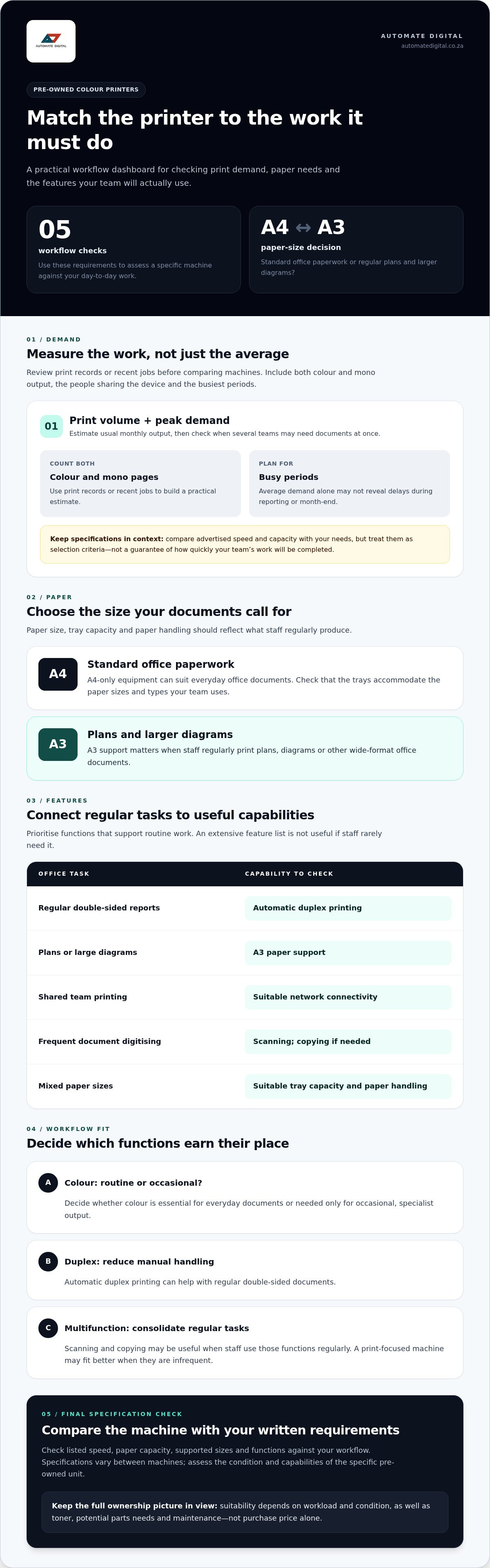
Specifications are useful when they address a day-to-day requirement. Before comparing a pre-owned colour printer, estimate your usual monthly output and busiest periods, then consider how many people will share the device. A printer used by a small team with steady demand may need different capacity from one serving several departments during reporting or month-end.
How do print volume and paper size affect selection?
Use print records or review recent jobs to estimate monthly page volumes, including colour and mono output. Account for peak demand as well. A machine that seems suitable in an average month may cause delays when several teams need documents at once. Compare the advertised speed and capacity with your needs, and treat those figures as selection criteria, not a guarantee of how quickly your team’s work will be completed.
A4-only equipment can suit standard office paperwork. A3 support matters if staff regularly print larger plans, diagrams or other wide-format office documents. Check that paper trays accommodate the sizes and types you use. Finishing functions are worth prioritising only when they support a regular task, such as preparing multi-page documents in-house.
Which colour and multifunction features are worth prioritising?
Decide whether colour is essential for routine documents or needed only for occasional, specialist output. Then consider workflow features. Duplex printing can reduce manual handling for double-sided documents, while scanning and copying may consolidate equipment if staff use those functions regularly. Network printing is relevant when several authorised users need to send jobs to a shared device.
Use this quick guide to connect common tasks with capabilities to look for:
Prioritise functions staff will use instead of choosing an extensive feature list. A multifunction printer may streamline work that involves printing, scanning and copying. A print-focused machine may be a better fit if those other tasks are infrequent. Compare the listed speed, paper capacity, supported sizes and functions with your written requirements, as specifications vary between machines.
Once you have identified the capabilities that matter, compare them with the pre-owned printer range as part of your purchasing assessment.
Pre-owned or new colour printer: how should you compare the options?
A pre-owned colour printer can suit a business when the specific unit is in suitable condition and fits the workload. A new machine may offer features that better match a changing workflow, while a pre-owned option may meet established requirements with a lower initial outlay. Neither option is automatically more reliable or economical.
Compare both options using the same practical criteria: purchase price, required features, expected print volume and ongoing operating needs. Review the specific listing for relevant specifications and condition details rather than assuming all machines in either category are alike. Check the fit with your paper formats, user access and colour output needs, then consider toner use, replacement parts and maintenance planning.
What affects the total cost of owning a printer?
The purchase price is only one part of ownership. Factor in the toner needed for typical jobs, potential replacement parts and routine maintenance. Expected usage matters, too. A machine used heavily or for frequent colour printing may have different consumable and upkeep requirements from one handling occasional documents.
Consider the operational impact as well. If a printer is unavailable during a busy period, staff may need to delay or reorganise work. The importance of uninterrupted printing depends on your business. A team producing time-sensitive customer documents may face different risks from one whose colour jobs can wait. Compare these practical demands without relying on assumed average costs or savings.
How should reliability concerns shape the decision?
Assess the individual unit, not just its age or pre-owned status. Its condition and service history can help you understand its use and what maintenance may be relevant. Review the product information carefully, and use the condition-assessment guidance in this article to structure your checks.
Consider how much risk your team can accommodate, based on the importance of printing continuity. If colour documents are central to daily operations, prioritise equipment fit and a clear plan for toner, parts and maintenance. If printing is less time-sensitive, your procurement priorities may differ. Either way, compare the full operating picture rather than treating the initial purchase amount as the deciding factor.
Overall suitability depends on the equipment’s condition, its fit with your workload and your ongoing support needs. That comparison gives your business a practical basis for choosing between pre-owned and new colour printing equipment.
How can your team prepare to buy a pre-owned colour printer?
A short requirements brief turns a broad search into a practical comparison. It helps your team assess whether a pre-owned colour printer fits daily work and plan for the supplies and parts the specific machine needs.
What should go into a printer requirements brief?
Record how the printer will be used before comparing listings. Separate essential requirements from optional features so the decision is guided by useful functions, not an appealing specification that staff may rarely use.
Document your current setup. Note the equipment in use, what it handles well and where delays or limitations arise.
Estimate print demand. Record routine and peak monthly volumes, including how much printing is in colour.
Describe the documents. List common jobs, such as reports, presentations, forms or marketing materials, along with the paper formats they require.
Count users and map access. Identify how many people will share the printer, where they work and whether they need network access from different devices or areas.
Set must-haves and preferences. Specify essential functions such as duplex printing, scanning or copying, then list optional features separately.
If your business has teams in Johannesburg or Pretoria, or in the Western or Northern Cape, note where users are based and how they need to access shared equipment. This makes connection requirements clearer, particularly when the printer will serve more than one office location.
How can you plan for consumables and ongoing use?
Before purchasing, identify the toner cartridges and spare parts associated with the specific printer model. Record their exact names or references alongside the listing details, then plan how your team will monitor supply levels and arrange replenishment. This brings consumables into the selection process, rather than leaving them as a separate task after installation.
When comparing suitable listings, keep the printer’s expected use in view. Do not assume that supplies or parts for one machine will fit another. Automate Digital sells toner cartridges and printer spare parts alongside office equipment, making these products part of the same purchasing consideration.
Once your requirements brief is ready, compare it with the pre-owned printer range to find equipment relevant to your team’s workflow.
How Automate Digital supports pre-owned colour printer purchasing
Choosing a printer involves more than comparing specifications. Your team needs equipment that fits its workload, a practical plan for toner and parts, and a clear understanding of the machine’s details. Automate Digital is a South African workplace technology provider with over 13 years in the office automation industry, serving businesses across Southern Africa and SADC countries.
Why source workplace equipment through Automate Digital?
Automate Digital sells pre-owned colour printers alongside toner cartridges, printer spare parts and wider office equipment. This makes it easier to consider the printer and its consumables together when planning for workplace needs. The company also provides office automation and ICT solutions for Southern African businesses, with equipment and services spanning printing, binding and connectivity.
This broader range is useful when planning around an existing office setup. The right equipment still depends on the specific machine and your requirements, so assess the relevant features and specifications in each product listing. Do not assume that every printer has the same condition, capabilities or consumable requirements.
What is the next step for a business buyer?
Use your requirements brief to shortlist equipment systematically. Compare each suitable listing with your estimated print volume, colour use, paper formats, user access and essential functions. Then consider the specific toner cartridges and printer spare parts needed for ongoing use. This keeps the decision grounded in operational fit, not just the purchase itself.
Automate Digital’s range forms part of a wider workplace equipment offer, so printer planning can sit alongside other office requirements. Review the product information for model-specific details, then compare it with your team’s documented needs before deciding.
If your shortlist is ready, explore pre-owned colour printers and assess the available listings against your business workflow and consumables plan.
Make your next printer decision with confidence
A pre-owned colour printer can be a practical fit when its condition, capacity and functions align with the work your team needs to produce. Compare the equipment with your actual workflow, then account for toner, spare parts and maintenance alongside the initial purchase. A clear requirements brief helps keep the decision grounded.
Automate Digital brings over 13 years of experience in South African office automation. Its range includes pre-owned printers, toner cartridges, printer spare parts and wider workplace equipment, giving businesses a practical starting point for planning equipment and consumables together.
Review the available listings and shortlist machines against your documented needs. Explore Automate Digital’s pre-owned colour printers to take the next step towards equipment that supports your business workflow. A considered approach can help you choose a suitable printer for your team’s daily work.
Frequently Asked Questions
What should I check before buying a pre-owned colour printer?
Check that the specific machine’s condition and listed capabilities match your business requirements. Review its model, supported paper sizes, suitability for your print volume, colour output, connectivity and any scanning or copying functions you need. Identify the correct toner cartridges and relevant spare parts, and review the available information about the unit’s condition and service history. Compare these details with your workload rather than relying on the description “pre-owned” alone.
Is a pre-owned colour printer suitable for a small business?
Yes, a pre-owned colour printer can suit a small business if its condition, functions and capacity fit the team’s actual workload. An office printing occasional colour proposals has different demands from one producing colour reports throughout the week. Estimate routine and peak printing, consider the number of users, and plan for toner and parts. A smaller business should assess operational fit just as carefully as a larger organisation.
How do I choose the right pre-owned colour printer for my office?
Choose by documenting what your office prints and how staff will use the device. Record monthly and peak print volumes, colour needs, document types, paper formats, user numbers and connection requirements. Decide whether you need duplex printing, scanning or copying, and separate essential features from optional ones. Then compare these requirements with the model-specific details in each listing, including its condition, supported functions and consumables.
Are pre-owned colour printers more cost-effective than new printers?
They may have a lower initial purchase cost, but that alone does not establish which option is more cost-effective. Compare the listed purchase price with expected toner use, potential parts, maintenance and the effect of downtime on your team. A new printer may better suit requirements for particular features or changing workloads. The sensible choice depends on the specific machine, its condition and the operating demands it will face.
Can a pre-owned colour printer scan and copy documents as well as print?
Some printers include scanning and copying, but these functions depend on the specific machine. Check the listing to see whether it is a multifunction device and which capabilities it includes. Consider how often staff scan or copy, and whether those functions suit the office workflow. Do not assume every colour printer can scan or copy, or that those functions will meet your needs without checking the model details.
Which toner does a pre-owned colour printer use?
A pre-owned printer uses toner cartridges compatible with its specific model, so identify the model before planning supplies. Check the product information for model details, then match the toner reference to that machine rather than relying on appearance or brand alone. Record any relevant spare parts and plan how your team will monitor supplies. Automate Digital sells toner cartridges and printer spare parts alongside office equipment.
Where can businesses in South Africa buy pre-owned colour printers?
Businesses can explore pre-owned colour printers through Automate Digital’s online shop. The South African workplace technology provider serves businesses across Southern Africa and SADC countries. Businesses in Johannesburg, Pretoria, the Western Cape and Northern Cape, as well as Mozambique, Swaziland, Zambia and Malawi, can review the available listings. Compare each machine’s details with your workflow and consumables requirements before deciding.


Comments