

Refurbished Konica Minolta bizhub Printer: South African Buyer’s Guide 2026

What if a refurbished Konica Minolta Bizhub printer could meet your office’s needs without bringing avoidable downtime or running costs? A lower purchase price is only worthwhile when the machine’s condition, capabilities and ongoing supply needs suit the work it has to do.
It’s sensible to look beyond a printer’s age. Age alone won’t tell you how much useful life remains, and a model that looks suitable on paper may not match your monthly print volume, colour requirements or finishing needs. Toner compatibility, spare parts and maintenance also affect the total cost of ownership.
This guide explains what to assess before choosing a refurbished bizhub in South Africa. You’ll learn how to compare the exact device’s condition and capabilities with your print and copy workload, plan for consumables and assess the purchase against your workplace requirements. Automate Digital supplies pre-owned colour printers, multifunction printers, toner and printer spare parts. The sections ahead offer practical checks to help you compare equipment for businesses in Johannesburg, Pretoria, the Western Cape and Northern Cape, as well as Mozambique, Swaziland, Zambia and Malawi.
Table of Contents
Is a refurbished Konica Minolta bizhub printer right for your office?
How to assess a refurbished bizhub’s condition and expected workload
Compare bizhub capabilities, consumables and total ownership needs
A South African buyer’s checklist for purchasing a refurbished bizhub
Source a refurbished Konica Minolta bizhub through Automate Digital
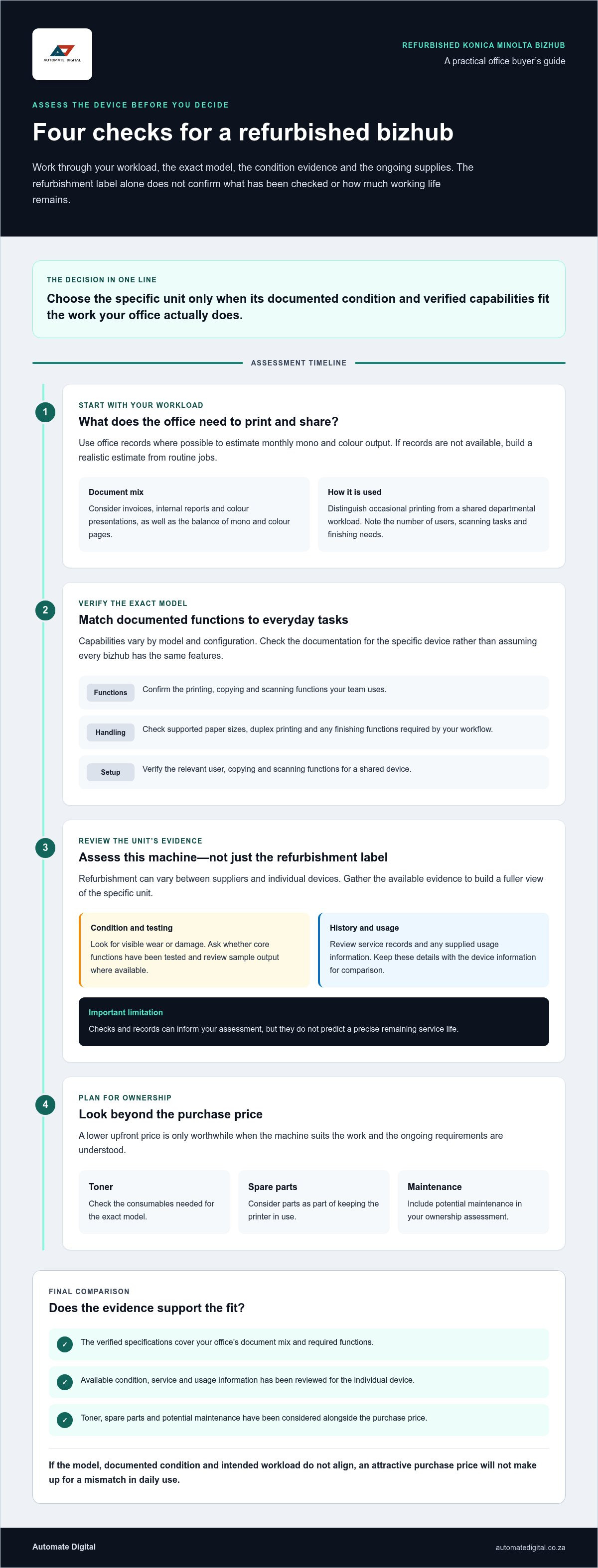
Is a refurbished Konica Minolta bizhub printer right for your office?
A refurbished bizhub may suit a South African office that needs business printing and copying but is weighing its budget against the capabilities required. The decision isn’t simply refurbished versus new. It’s whether the exact device can handle your work, offers the functions your team uses and comes with enough condition information to support an informed purchase.
In brief: a refurbished printer is a previously used device prepared for resale, and the work involved can vary by supplier and machine. The term alone doesn’t confirm what has been inspected, replaced or tested, or how much working life remains. Compare the product description with the available device documentation and condition details before deciding whether it fits your requirements.
What does refurbished mean for a bizhub printer?
Refurbishment isn’t a universal, identical process. Its scope can differ between suppliers and individual devices, so don’t treat the label as a standardised condition grade. A refurbished machine has been used before and prepared for resale; a new printer hasn’t previously been used in service. Neither description, by itself, tells you whether a particular model suits your office.
Review the information for the specific unit, including its condition and any service or usage records provided. The Konica Minolta name identifies the manufacturer, while the exact model documentation helps establish the device’s functions and specifications.
Which office workflows can a bizhub support?
Start with the documents your team handles. A model whose specifications include printing, copying and scanning may bring routine administration together on one device, but functions vary by model and configuration. Verify them against the documentation for the exact device rather than assuming every bizhub has the same capabilities.
For occasional printing in a small South African office, priorities may be straightforward document output and copying. A shared device serving a busier department may need to accommodate more regular use and several users’ workflows. Consider the balance of mono and colour pages, number of users, scanning tasks and any finishing needs. A machine that suits one office may be an awkward fit for another.
A refurbished Konica Minolta Bizhub printer is worth considering when its verified specifications, documented condition and intended workload align. If they don’t, an attractive purchase price won’t make up for a mismatch in daily use. Assess the model and the individual device separately, then compare both with your actual requirements.
How to assess a refurbished bizhub’s condition and expected workload
A refurbished device’s condition and its suitability for your workload are related but separate checks. Records and tests can provide useful evidence about the machine in front of you, but they can’t guarantee how long it will continue operating. Assess the specific unit and exact model rather than relying on a general description of the bizhub range.
What condition information should buyers review?
Review the evidence available for the device. Its physical condition can reveal visible wear or damage, while operational testing can show whether core functions work during a test. Service records may indicate work previously carried out, and usage information, if supplied, can add context about the machine’s history. Each provides a different perspective.
Where available, review sample output and check relevant functions such as printing, copying and scanning. Look for consistent output and note visible marks or faults. A useful purchase review might cover:
What condition details and service history accompany this unit?
Is usage information available, and what does it tell you?
Can you review sample output or results from functional checks?
These checks help you compare devices more thoughtfully, but they don’t predict a precise remaining service life. Keep the evidence with the device details so you can assess more than the product description alone.
How should print volume and functions influence the choice?
Use actual office records where possible to estimate monthly mono and colour output. If records aren’t available, build a realistic estimate from routine jobs such as invoices, internal reports and colour presentations. Distinguish occasional use from a shared departmental workload: a device serving several teams may face different demands from one used for intermittent printing.
Compare those needs with the exact model documentation. Check supported paper sizes, duplex printing and any finishing functions your workflow requires. For a shared device, verify the relevant user, copying and scanning functions rather than assuming they’re standard across all bizhub models. Paper handling and workload suitability also depend on the precise model and configuration.
Consider the wider ownership picture alongside workload. Toner, spare parts and potential maintenance affect the cost of keeping a printer in use; the Total Cost of Ownership for a printer perspective helps frame the purchase as more than an upfront decision. For related workplace equipment and supplies, explore pre-owned colour printers from Automate Digital.
Compare bizhub capabilities, consumables and total ownership needs
Compare each candidate with the tasks your office performs and the supplies it will need over time. A feature only adds value if employees use it, and toner or parts compatibility can’t be assumed across the bizhub range. Record your requirements alongside the verified specifications and evidence for the specific device.
Which bizhub functions matter for your document workflow?
Start with the documents your team produces. If staff regularly print large-format plans or spreadsheets, check whether the exact model supports the required paper size. Don’t assume A3 or A4 handling, duplex printing, scanning or finishing options from a model’s name or a similar device. Confirm them in the documentation for the model and configuration you’re considering.
Compare network and print-language requirements with your office systems, too. A function that looks useful on paper may not fit the way staff submit jobs or share documents. Use this table to structure the comparison:
How do toner and spare parts affect ownership planning?
Identify the exact model before researching toner cartridges or replacement parts. Similar-looking devices can require different consumables, so check the model reference against the relevant compatibility information. Include anticipated toner use, based on your actual mono and colour document mix, and likely maintenance needs in your procurement comparison.
Colour capability may be essential for client-facing material, charts or presentations. If most output is internal text, colour may be used less often. Neither use case guarantees a lower total cost: compare what your office actually prints with the supplies the specific machine requires.
The best-fit printer is the model that meets required tasks without unused complexity. Automate Digital supplies toner cartridges and printer spare parts alongside pre-owned colour printers and multifunction printers. Consider the equipment and its ongoing supplies together, rather than evaluating a refurbished Konica Minolta Bizhub printer by its feature list or purchase price alone.
A South African buyer’s checklist for purchasing a refurbished bizhub
A short procurement checklist helps your team compare devices against the same business requirements instead of focusing on a product description alone. Document the workload first, then assess the exact machine, supplies and delivery arrangements. This makes practical gaps easier to spot before purchase.
What should you document before comparing machines?
Build a brief around your office’s day-to-day needs. Use available print records where possible, and note seasonal or project-related peaks that could affect demand. Include the tasks employees regularly complete, not just features that might be useful occasionally.
Record print demand: estimate monthly mono and colour volumes, paper sizes and peak periods.
List essential functions: note copying, scanning, duplex printing and finishing tasks your team actually performs.
Describe the installation site: record the available space, existing network arrangements and relevant power requirements so they can be assessed against the exact model.
Identify how the device will be shared: consider the departments or users relying on it and the document workflows it needs to support.
What should you establish before completing the purchase?
Use the precise model and configuration as the reference point for each final check. A product name alone may not show which functions or accessories are included, and capabilities can differ across bizhub models.
Match the details to the device: check that the quotation or product information identifies the exact model and states what equipment is included.
Review condition information: read the description and available condition evidence, service history or usage details for the specific unit.
Set out delivery arrangements: establish how delivery to your South African business site will be handled, including practical access and placement requirements.
Read the purchase terms: review the terms stated for the transaction so your procurement records reflect what has been agreed.
Check ongoing supply needs: use model-specific information to identify compatible toner and spare parts, then include expected consumable use and maintenance needs in your internal comparison.
Recheck the fit: compare the verified functions and condition evidence with your documented workload before making the final decision.
This process keeps the decision grounded in operational requirements, not assumptions about refurbishment or model features. To compare workplace printing equipment, explore Automate Digital’s printer range, including pre-owned colour printers and multifunction printers.
Source a refurbished Konica Minolta bizhub through Automate Digital
Base the final decision on three checks: verified capabilities for the exact model, documented condition for the individual device and a realistic fit with your office’s workload. Consider them together. A suitable multifunction printer must meet everyday requirements, work with the way your team handles documents and make sense alongside the toner and parts needed for ongoing operation.
How Automate Digital fits into office-equipment procurement
Automate Digital is a South African workplace-technology supplier with more than 13 years of experience in the office automation industry. Its equipment and supply categories include pre-owned colour printers, multifunction printers and copiers, toner cartridges and printer spare parts. This range lets businesses consider printing equipment alongside the supplies required for their workplace workflows.
When evaluating a refurbished Konica Minolta Bizhub printer, focus on the exact model and unit. Use model documentation to verify functions and specifications, then use available device information to assess condition. Automate Digital’s office-equipment range includes pre-owned printers and related supplies, while the model documentation and unit-specific evidence guide your assessment of a particular machine.
What to do next when a bizhub meets your requirements
Bring your checklist together before comparing equipment. Include expected monthly print volumes, the balance of mono and colour documents, required paper sizes and the functions your team uses regularly. Add the site’s space, network and power considerations, then compare each device against those needs rather than choosing by model name alone.
Once a model appears to fit, connect the equipment decision to your ongoing supply plan. Record the exact model reference and use model-specific information to plan for compatible toner and spare parts. Include likely consumable use and maintenance needs in your procurement assessment, so the decision reflects day-to-day operations as well as printer features.
Automate Digital serves businesses across Southern Africa and SADC countries, including Johannesburg, Pretoria, the Western Cape, the Northern Cape, Mozambique, Swaziland, Zambia and Malawi. A considered comparison helps your organisation weigh equipment against its workflow and procurement priorities. Explore Automate Digital’s equipment range to review its printer and multifunction equipment categories.
Make your next printer decision with confidence
Assess a refurbished Konica Minolta Bizhub printer against the work it needs to handle, not its name alone. Match the exact model’s verified specifications to your print volume, colour use and required functions, then weigh that fit against the device’s documented condition. Plan for compatible toner and spare parts as part of ongoing ownership.
Automate Digital brings more than 13 years of experience in the South African office automation industry. Its range includes pre-owned colour printers, multifunction printers, toner and printer spare parts, serving businesses across Southern Africa and SADC countries. These equipment and supply categories support a considered approach to workplace procurement.
Use your checklist to compare options at a practical pace. Explore Automate Digital’s office printer range and take the next step towards equipment that fits your business requirements.
Frequently Asked Questions
Is a refurbished Konica Minolta bizhub printer suitable for a small business?
Yes, if the specific machine’s verified functions, documented condition and workload fit the business. A small office with occasional printing may need different capacity and features from a team sharing one device for daily printing, copying and scanning. Estimate monthly mono and colour output, consider the tasks staff perform, and compare those needs with the exact model’s specifications before deciding whether a refurbished Konica Minolta Bizhub printer is a practical fit.
What should I check before buying a refurbished bizhub printer?
Review the exact model, its listed configuration and the condition information for the individual device. Consider available service history and usage details, and examine sample output or functional-test information where supplied. Compare the documented functions with your office’s requirements, then check delivery arrangements, purchase terms and model-specific toner and spare-parts compatibility. These checks help you make a considered choice, but they can’t guarantee the machine’s remaining service life.
How can I find the right bizhub model for my office’s print volume?
Start with actual office records to estimate monthly mono and colour pages, noting peak periods and whether the printer will be shared across departments. Compare that workload with the precise model’s documentation, including its paper handling and required functions. Consider scanning, duplexing and finishing only if they support regular tasks. Don’t transfer a capacity or feature assumption from one bizhub model to another; verify each candidate individually.
Are toner cartridges interchangeable between Konica Minolta bizhub models?
No, don’t assume that a toner cartridge will fit multiple bizhub models. Compatibility depends on the exact printer model, so identify the device precisely and use model-specific supply information before purchasing toner. The same approach applies to replacement parts. Recording the model reference during procurement helps your team plan future consumables and reduces the risk of ordering supplies that aren’t suitable for the machine.
Can a refurbished bizhub print, copy and scan in colour?
Some bizhub configurations support colour printing, copying and scanning, but functions vary by model. Check the documentation for the exact device rather than relying on the bizhub name or a general product description. Confirm which functions are supported and whether they meet your document workflow. If your office mainly produces monochrome text, compare that real document mix with your colour requirements before selecting a device.
What is the difference between a refurbished and a used bizhub printer?
“Used” indicates that a printer has been used before; “refurbished” generally describes a previously used device prepared for resale. The term refurbished doesn’t represent one universal process, so it doesn’t tell you by itself what work was carried out or what condition the individual printer is in. Review the available condition details, service history and usage information instead of treating either label as a guarantee.
How do I estimate the ongoing running costs of a refurbished bizhub?
Build an ownership estimate from your expected mono and colour output, compatible toner requirements, likely spare-parts needs and any maintenance costs included in your procurement planning. Use the exact model to research supplies, then compare those needs with your actual document mix rather than assuming colour or mono will automatically cost less. Explore Automate Digital’s office printer and supplies range for equipment and consumables for businesses in Johannesburg, Pretoria, the Western Cape and Northern Cape, Mozambique, Swaziland, Zambia and Malawi.


Comments