

Refurbished Printer Condition: What to Check Before You Buy

A refurbished label doesn’t prove that a printer is ready for the demands of a busy office. The real refurbished printer condition becomes clearer when you check output, operation, wear and service history, rather than relying on appearance or a grade alone.
Look beyond the lower purchase price. A printer may look tidy yet show faults during repeated jobs, while a high page counter needs context before you can judge its remaining usefulness. Focus on practical evidence of performance and whether the machine suits your workload.
This guide explains how to assess print quality and basic functions with a repeatable checklist, interpret counters and test results, and spot wear that deserves closer attention. It also covers service records, expected maintenance and how to match a printer’s capacity to your office’s needs, so you can weigh upfront savings against ongoing reliability.
For South African businesses considering pre-owned colour or mono printers, these checks can make the decision more straightforward. Automate Digital has over 13 years in the office automation industry and supplies pre-owned printers, toner cartridges and spare parts.
Table of Contents
What does refurbished printer condition actually mean?
Refurbished printer condition describes a previously used machine’s current state, and should be supported by observable evidence that its functions work as expected. The label alone doesn’t show what was inspected, repaired or tested, or how consistently the printer performs. For a purchasing decision, look for specific results and service records rather than relying on a broad description.
The word “refurbished” can cover different levels of work. One machine may have been cleaned and checked, while another may have had components repaired or replaced. Seller grades and terms such as “excellent” and “good” can also mean different things. For background on the term, see What refurbished means in the context of electronics. Treat any condition label as a starting point, not a universal grading standard.
Refurbished, used and reconditioned: what do the terms tell you?
“Used” tells you the printer has had a previous owner. It doesn’t establish whether it works well now. “Reconditioned” and “refurbished” suggest some form of attention, but the words don’t specify its extent. A previously used printer may still operate reliably, while a machine described as refurbished still needs evidence to support that description. Give test results and available service information more weight than terminology alone.
Which parts of a printer’s condition matter most?
Separate cosmetic wear from function. Scuffs or faded panels may affect appearance without affecting output, while a clean exterior can conceal a feed or print problem. Assess the machine against the work it needs to handle, not just how it looks.
Print quality: Output should be legible and consistent for the documents your office produces, whether monochrome or colour.
Scanning: If it’s a multifunction printer, check that the scanner captures documents clearly and that its basic controls respond.
Paper handling: Trays, guides and feed mechanisms should handle the paper sizes and types your team uses without repeated jams or misfeeds.
Controls and physical state: Check that the control panel responds and look for damage, loose parts or signs of rough handling.
These checks establish basic operation, not a guarantee of future reliability. Consider expected print volumes, essential features and the disruption a fault could cause. A machine that passes a brief test but cannot support the office’s daily workload may not be the right fit. For South African businesses comparing pre-owned colour and mono printers, matching condition evidence to actual usage helps keep a purchase decision practical.
How to inspect refurbished printer condition with practical tests
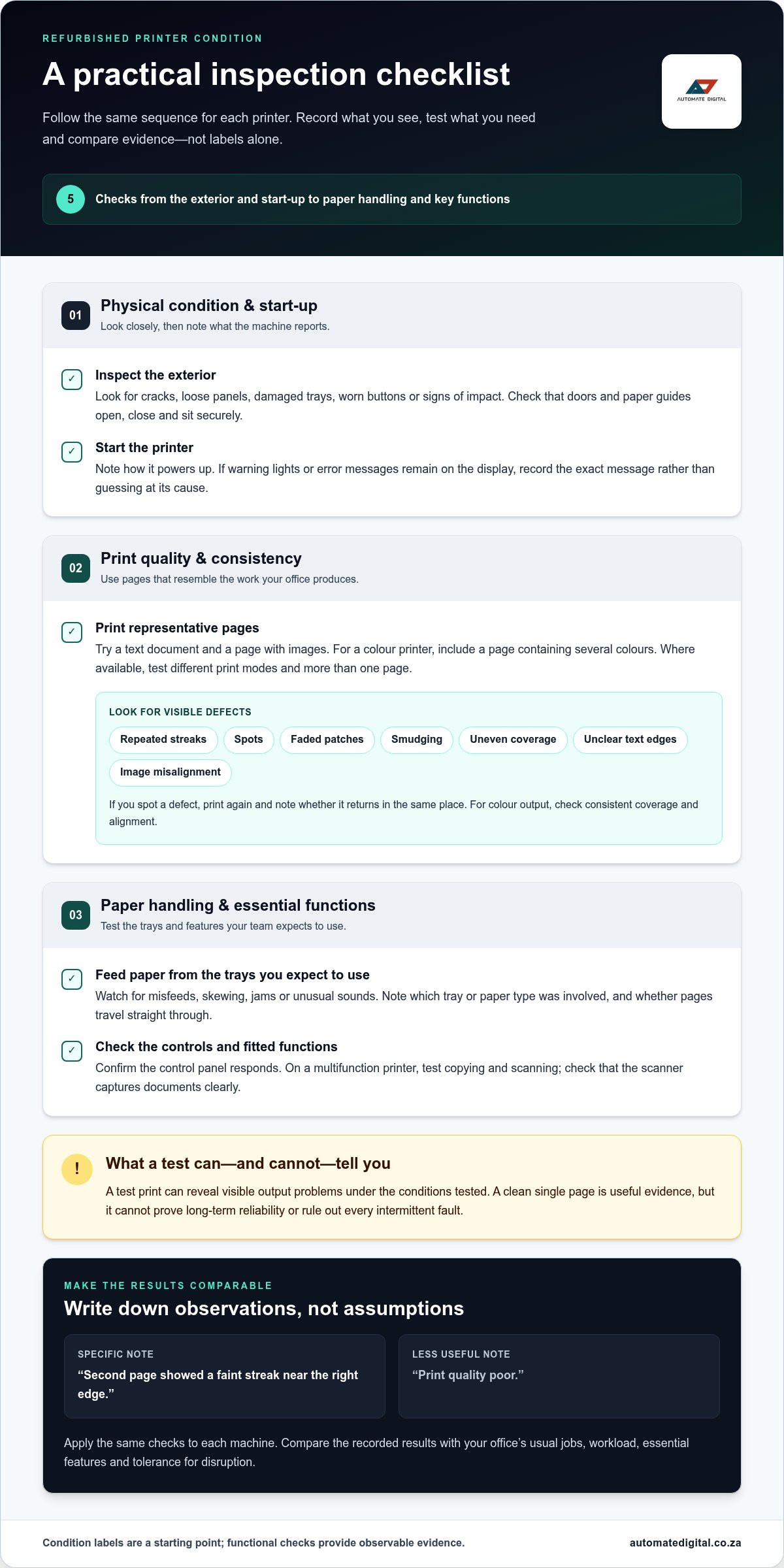
A repeatable check is more useful than a quick look at the casing. Follow the same sequence for each machine and write down what you observe. This makes results easier to compare and separates visible evidence from assumptions about refurbished printer condition.
1. Inspect the exterior. Look for cracks, loose panels, damaged trays, worn buttons or signs of impact. Check that doors and paper guides open, close and sit securely.
2. Start the printer. Note how it powers up and whether warning lights or error messages remain on the display. Record the exact message rather than guessing what caused it.
3. Print representative pages. Use a text document, a page with images and, for a colour printer, a page containing several colours. Where available, try different print modes and more than one page to see whether output stays consistent.
4. Test paper handling. Feed paper from the trays you expect to use. Watch for misfeeds, skewing, jams or unusual sounds, and note which tray or paper type was involved.
5. Check key functions. Test the control panel and, on a multifunction machine, copying and scanning. Confirm that the functions your office relies on respond as expected.
What should a test print show?
Check for repeated streaks, spots, faded patches, smudging and uneven coverage. Inspect text edges for clarity and images for alignment. On colour output, focus on consistent coverage and alignment, not whether the colours match your personal preference. If you spot a defect, print again and note whether it returns in the same place.
A test print can reveal visible output problems under the conditions tested, but it cannot prove long-term reliability or rule out every intermittent fault. A clean single page is useful evidence, but it isn’t a forecast of future performance.
How should you check paper handling and core functions?
Repeat the feed check with the available trays and observe whether pages travel straight through. Record any misfeed, skew or persistent noise, including when it occurs. Test copying and scanning if fitted, and try the control-panel functions you’ll need in daily use. BGR’s guide to what to ask before buying refurbished technology also highlights the value of checking condition before purchase.
Keep your notes specific. For example, “second page showed a faint streak near the right edge” is more useful than “print quality poor”. If you’re comparing pre-owned printer options, apply the same checks to each machine and compare the recorded results with your office’s usual jobs.
What wear, counters and print defects can reveal about a printer
Marks on a casing and defects on a page carry different weight. Scuffs, faded labels or scratches may be cosmetic, while recurring streaks, misfeeds or error messages can affect everyday work. Use visible signs as clues to investigate, not as proof of a specific fault. A clear account of a refurbished printer’s condition, supported by test results and service information, can help you assess a pre-owned machine for your business.
How should you interpret a printer’s page counter?
A page counter records the printer’s output to date. It doesn’t independently establish how much useful service life remains. Two machines with similar counters may differ in maintenance, operating conditions, wear and current performance. Likewise, a low counter isn’t proof that every function works correctly.
Consider the counter alongside test prints, paper handling, visible wear and available service history. Look for consistency between the records and the machine’s observed condition. There’s no universal counter threshold that determines whether a printer is safe to buy or too heavily used. The figure needs context.
Which print defects deserve closer attention?
Recurring marks matter more than a single unexplained blemish. Print the same type of page again and note the location and pattern of any defect. Possible causes can overlap, so treat these observations as prompts for further assessment, not component diagnoses.
A symptom alone doesn’t identify a faulty component. Imaging drums, toner cartridges and fuser units are possible areas for diagnosis, but further technical assessment may be needed to determine the cause. Record the evidence rather than assuming that a part must be replaced.
For a business, the key question is whether the printer produces consistent documents and handles its expected workload. Cosmetic wear may be acceptable if it doesn’t affect operation. Repeated print or feed faults deserve closer attention because they can interrupt routine tasks. Weigh the counter alongside the evidence, not in isolation.
A pre-purchase checklist for refurbished printer condition
Use this checklist to compare what a printer can do with what your office needs. Record observations as you inspect each machine. Specific notes are more useful than memory or a general condition label, particularly when you’re weighing several pre-owned options.
☐ Test prints: Record the date and check representative text, image and colour pages where relevant. Note any streaks, spots, smudging, fading or alignment issues, and whether they recur on a repeat print.
☐ Paper handling: Test the trays your team expects to use. Write down any jams, skewed pages, misfeeds or unusual sounds, including which tray was in use.
☐ Functions: List the functions tested, such as start-up, control-panel operation, printing, copying and scanning where fitted. Note any warnings or error messages, and mark functions that still need assessment.
☐ Physical condition: Record visible damage, loose panels, worn controls or tray issues. Separate cosmetic marks from anything that affects operation.
☐ Counter and records: Note the page-counter reading alongside any available service or maintenance documentation. The counter provides context, not a standalone measure of remaining service life.
☐ Business fit: Confirm that tested output, paper handling and functions suit your team’s documents, expected workload, colour needs and scanning requirements.
What evidence should a buyer record?
Keep the notes together with any available test results and service information. Describe what happened rather than diagnosing the cause: “paper skewed from the lower tray” is more useful than “feed mechanism faulty”. This creates a clear comparison between machines and highlights gaps that need assessment before deployment.
How do you match condition to business use?
Start with routine tasks. An office producing mostly text documents may prioritise consistent monochrome output and reliable paper handling. A team preparing colour reports will need to inspect colour coverage and alignment as well. If staff scan or copy documents regularly, include those functions in the assessment. Then consider expected print volume and the operational impact of downtime.
For businesses in Johannesburg, Pretoria, the Western Cape and Northern Cape, as well as Mozambique, Swaziland, Zambia and Malawi, consider how location affects access to equipment support and parts, and what a printing interruption would mean for day-to-day operations. Don’t select solely on appearance or the lowest purchase price. Use documented evidence to judge whether the machine fits your requirements and whether any untested function presents an operational risk.
Use your checklist to compare pre-owned printer options against your office’s actual workload and support needs.
Use condition evidence to decide whether a refurbished printer fits
A considered purchase depends on more than a tidy casing or a low page counter. Refurbished printer condition should be supported by repeatable print results, working functions and paper handling that suit the office’s routine jobs. Weigh those findings against the value of the purchase, the availability of relevant parts and the disruption a fault could cause.
Evidence that supports moving forward includes consistent test output, reliable feeding in the trays you’ll use, responsive controls and tested functions that match your requirements. Available service or maintenance records add useful context. Warning signs include recurring print defects, repeated jams, persistent error messages or important functions that have not been tested. These don’t automatically rule out a machine, but they do call for further assessment before a decision.
When can a refurbished printer suit a business?
A pre-owned printer may suit a business when its demonstrated performance matches realistic workload expectations and the team’s essential tasks. For example, a machine that produces consistent text pages and feeds paper reliably may be a practical fit for routine monochrome documents, while a colour-heavy workflow needs evidence of consistent colour output. Record what passed, what did not and what remains untested, then use those facts in procurement review.
Consider serviceability and operational continuity as well as upfront procurement savings. In South Africa and nearby markets, access to equipment support and parts can differ by location, so factor in how a disruption would affect your team and operations. A machine that meets everyday needs with manageable risk may offer better value than one selected on appearance or purchase price alone.
What should your next step be after the inspection?
Summarise the inspection in a short condition record. Include test results, counter reading, visible wear, any error messages, available documentation and functions still requiring assessment. Compare that record with the work your team produces, expected print volume, colour requirements and whether scanning or copying is part of the daily workflow. This makes the decision easier to explain and compare internally.
If testing reveals limitations, consider whether a different capacity or equipment type would better support the workload. A basic printer may not suit a team that regularly needs scanning and copying, while a machine with features the office rarely uses may not be the most suitable choice.
Automate Digital offers pre-owned colour and mono printers for businesses assessing their office printing requirements. Explore Automate Digital’s pre-owned printer options and compare equipment with your documented needs.
Make your next printer decision with confidence
A refurbished printer’s label is only a starting point. Judge its condition by consistent test results, working paper handling and functions, and any available service records. A page counter or tidy exterior can add context, but neither proves how well the machine will meet your office’s needs.
Record what you tested, note any recurring defects and compare the evidence with your team’s print volume, colour requirements and tolerance for downtime. This gives procurement a practical basis for weighing upfront savings against reliable day-to-day operation and support needs.
Automate Digital has over 13 years in South Africa’s office automation industry, with pre-owned colour and mono printers among its equipment categories. Explore Automate Digital’s pre-owned printers and consider which options align with your documented requirements. With a clear assessment, you can make a more informed choice for your workplace.
Frequently Asked Questions
What does refurbished printer condition mean?
Refurbished printer condition describes the current state of a previously used machine, but the label alone doesn’t prove how it performs. Look for evidence such as clear test prints, reliable paper handling and working functions, alongside any available service or maintenance records. Cosmetic marks may be acceptable if operation is unaffected. Condition terms can vary, so compare observable results rather than assuming labels represent universal grades.
How can I check the condition of a refurbished printer?
Check the exterior, start the printer and note any persistent warnings. Print representative text and image pages, then repeat if you see streaks, spots, fading or smudging. Test the paper trays you expect to use and check for jams or skewing. Try the control panel, plus copying and scanning if fitted. Record what you tested and what happened so you can compare machines objectively.
Is a refurbished printer reliable for business use?
It can be suitable if its tested output, paper handling and functions match your team’s workload. Reliability can’t be established from a refurbished label alone, and a brief test can’t prove long-term performance. Review the results alongside available service information, parts considerations and the effect downtime would have on your operations. Automate Digital has over 13 years in the South African office automation industry and offers pre-owned colour and mono printers.
Can a printer page counter tell me how much life is left?
No. A page counter records the printer’s output, but it doesn’t independently show how much service life remains. Interpret the reading alongside test results, visible wear and any available service or maintenance history. A high reading isn’t automatically a reason to reject a machine, and a low one doesn’t prove it’s in good working order. There is no universal counter threshold that establishes whether a printer is suitable.
What do lines or spots on a printer test page mean?
Lines, spots, ghosting or uneven density are symptoms to investigate, not diagnoses. Possible areas include the toner cartridge, imaging drum or fuser unit, but a mark alone doesn’t identify the cause. Print the page again and note whether the defect returns in the same area. A recurring mark deserves closer assessment, particularly if it affects documents your business needs to produce clearly and consistently.
Should I choose a refurbished printer with visible cosmetic wear?
Cosmetic wear can be acceptable if it doesn’t affect operation. Scuffs or faded labels are different from cracked panels, loose parts or damaged trays that may interfere with use. Assess the machine’s functions and print output rather than judging by appearance alone. Consider whether the wear signals a practical issue, and record it alongside test results so procurement decisions reflect evidence and business requirements.
What should I check before buying a refurbished office printer?
Record test-print results, paper-feed behaviour, start-up warnings, physical wear, counter reading and available service records. Check each function your team will rely on, including colour printing, scanning or copying where relevant. Match the evidence to expected volume and the impact of downtime. Requirements can differ between Johannesburg and Pretoria, the Western and Northern Cape, and markets such as Mozambique, Swaziland, Zambia and Malawi.


Comments